

The rider app
Training and replay
For the rider - training with the GPS or in simulation, the off-course alarm with the back-track arrow, the LateNote warning "CHECK THE ROADBOOK!", tutor groups and the replay of your own rides in the app.
You learn a roadbook by using it. The app lets you train as in a race, with a few extra aids that you do not get in a race, and then lets you review the ride to understand where you went wrong.
Training and Simulation
From the card of a roadbook:
- Training: you ride with the GPS, with the same cockpit and the same rules as in a race (radii, zones, race STOP, neutralisations). The penalties in the summary are theoretical: they have no consequences. On personal rides you can switch off the race rules one by one (Settings › Waypoints › Training); in a group the tutor chooses them.
- Simulation: a fake GPS travels along the track at the speed you choose (with the ×1…×8 multiplier), to try out a roadbook at home or learn the controls. Simulated rides are marked as such and never count.
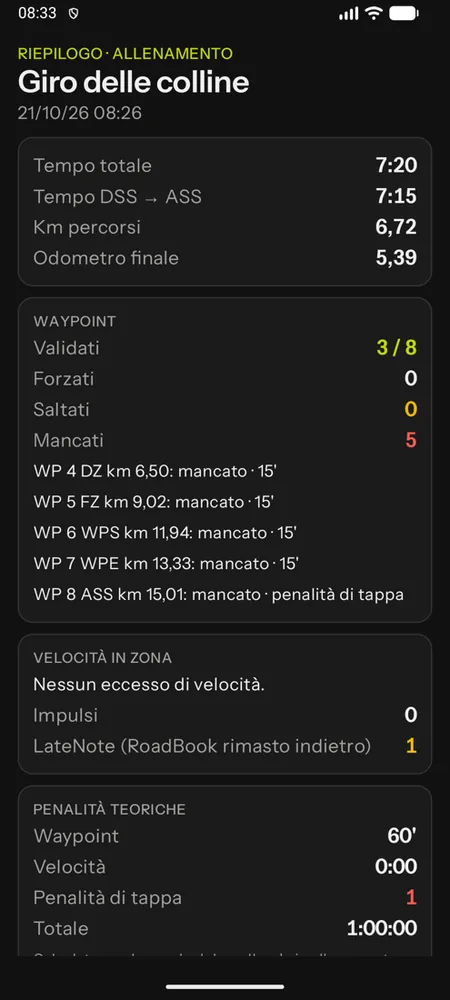
At the end of the ride the summary shows total and DSS–ASS time, km, waypoints validated, forced, skipped and missed, speeding in zones, LateNote episodes and theoretical penalties; the track can be exported as GPX from the History.
Off course and back-track
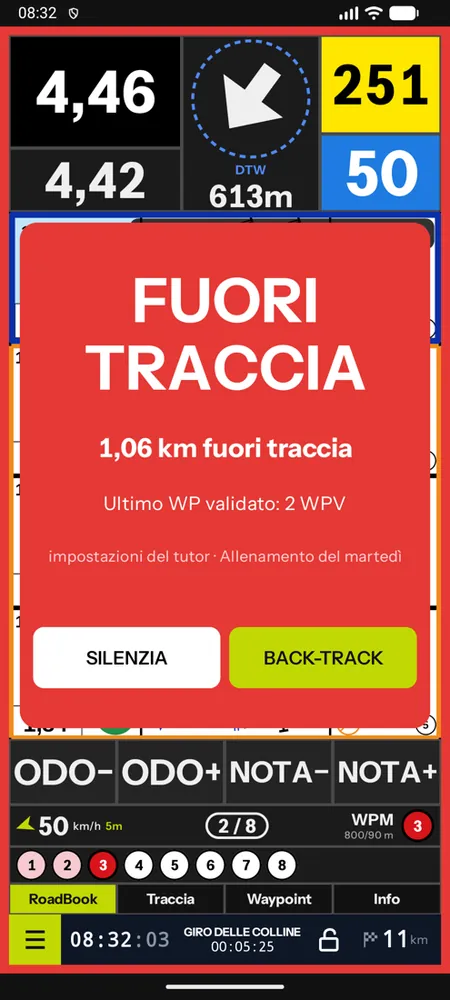
If you take a wrong turn and move away from the course, the app counts the km ridden off course (beyond a distance from the track, 150 m by default). First a discreet strip appears, "Off course · 0.42 km"; once the threshold is passed (1 km by default) the screen flashes OFF COURSE, with sound and vibration every 3 seconds.
- SILENCE stops the sound: a red strip remains with the km off course.
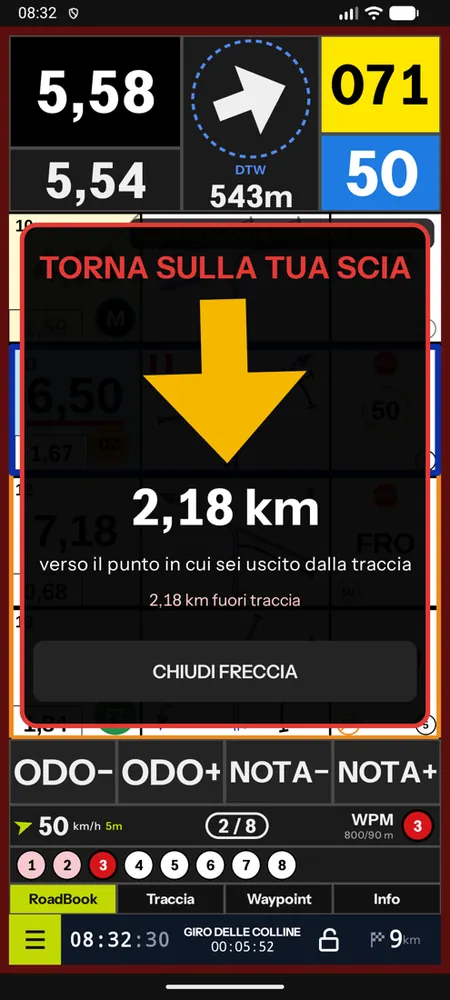
- BACK-TRACK opens an arrow that takes you back along your own trail, to the point where you left the track or to the last validated waypoint, with the metres to go. When you get there, the app announces it.
- Once you have been back on the track for a few seconds, "Back on course" appears.
The alarm settings come from:
- personal rides: your own, in Settings › Track (on, km, metres, back-track);
- training with a group: the tutor's; if you are in several groups the app asks you at the start which one you are training for;
- race stages: the organiser's (often off in timed stages).
Off-course episodes and back-track go into the replay.
LateNote
When you follow another rider, or a well-marked track on the ground, it is easy to stop reading the RoadBook. The RoadBook falls behind and, right in the section you are riding through, you do not read the notes that matter: a danger 3, a jump, a hole, a STOP. It is one of the most common causes of accidents in rally raids. Training to keep the RoadBook level is training for safety (and for fairness: in a race, a rider who follows exploits someone else's navigation).
In training, if the note shown in your RoadBook is more than 3 notes behind the road you have ridden, for at least 5 seconds, the screen flashes CHECK THE ROADBOOK! in orange with a sound and vibration, until you bring the RoadBook level again (with NOTE+, the remote control or your finger). Position is measured on the track, not on the odometer.
- The episode counter is in the Info panel and in the ride summary; the tutor sees the episodes in the group replay.
- Threshold and hold time are adjusted in the settings (Android: Waypoints tab, Training section; iPhone: RoadBook tab), or set by the tutor or the organiser; the warning can be turned off.
- It does not trigger with automatic scrolling on (there the RoadBook follows by itself), in Rally GPS mode, when you are off course and in neutralisations.
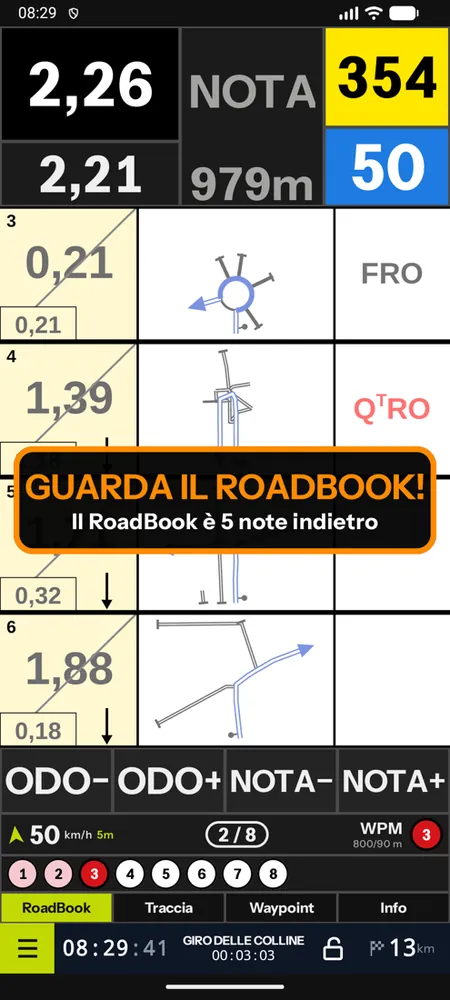
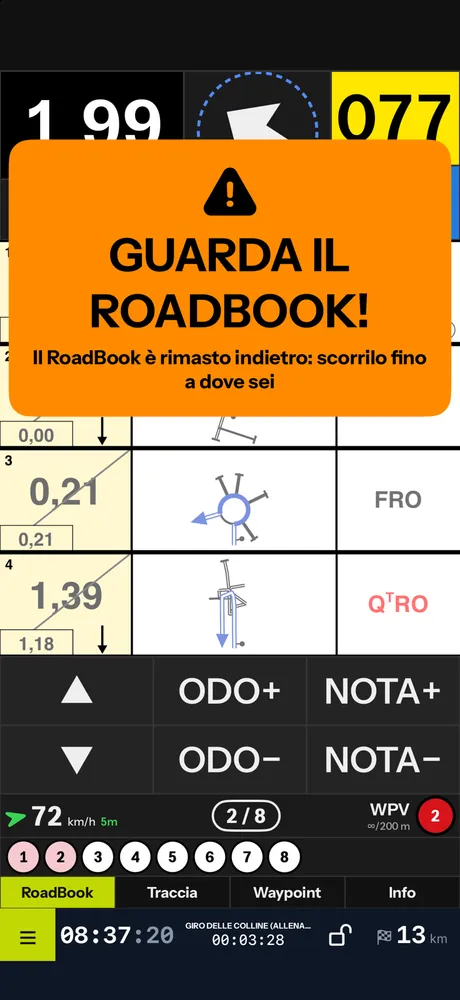
A tip: train without automatic scrolling (cockpit menu, or the tutor turns it off for the group). In a race, under the FIM W2RC 2027 regulations, the RoadBook is moved forward by hand only: getting used to doing it in training, note after note, is the simplest way to always read the right note, and LateNote tells you straight away when you fall behind.
In a race there is no warning: episodes are only recorded (see Racing with the app).
Tutor groups
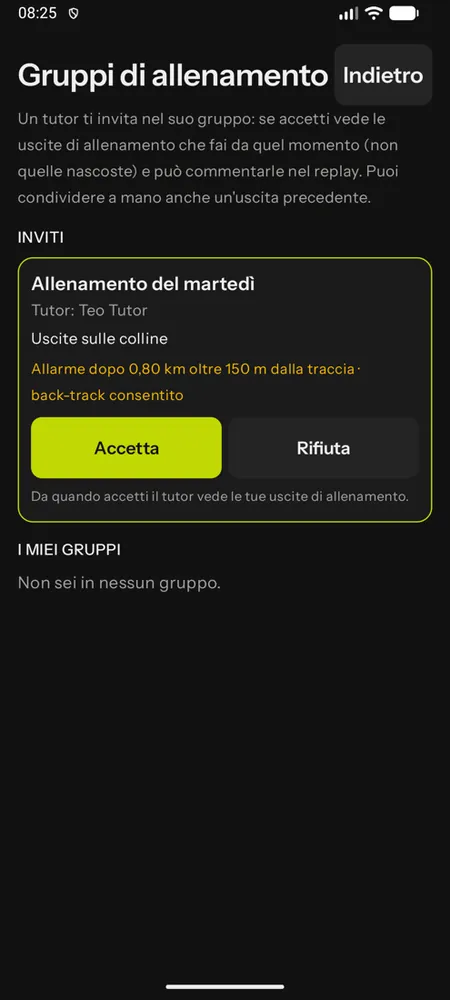
A tutor invites you into their training group: the invitation appears under Groups (with a green dot on the home screen). With Accept the tutor sees the training rides you make from that moment on: not races, not recces, not simulations and not the ones you hide. They can leave you comments on points of the track. Leave the group whenever you like: from then on the tutor sees nothing more, not even what you had shared manually.
The replay in the app
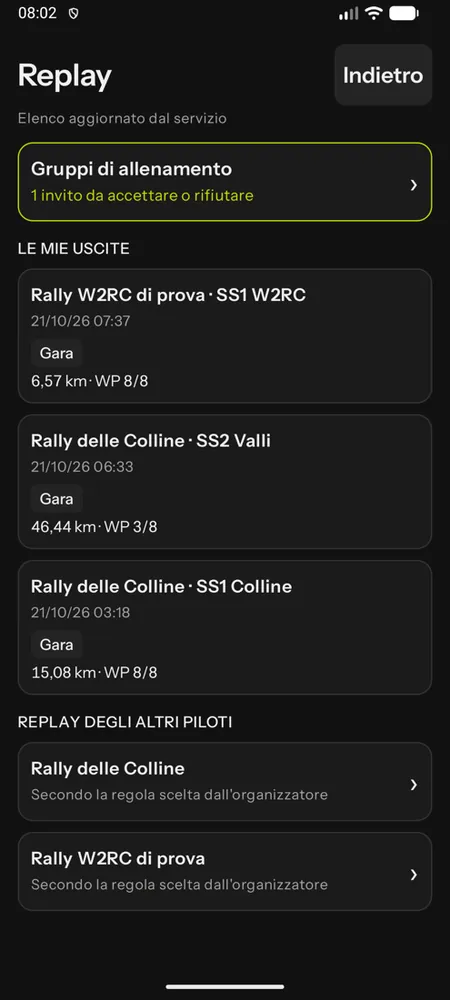
Replay on the home screen lists my rides: those on the service, with comments and the groups that can see them, and those only on the phone (not sent yet, without an account or simulated). For each one: Open the replay, Share with a group a ride made before you joined it, Hide from tutors or Show to tutors.
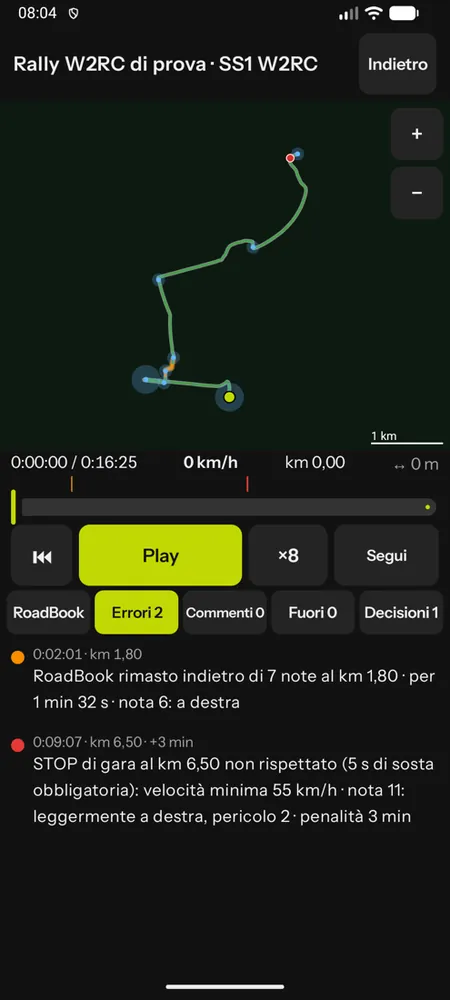
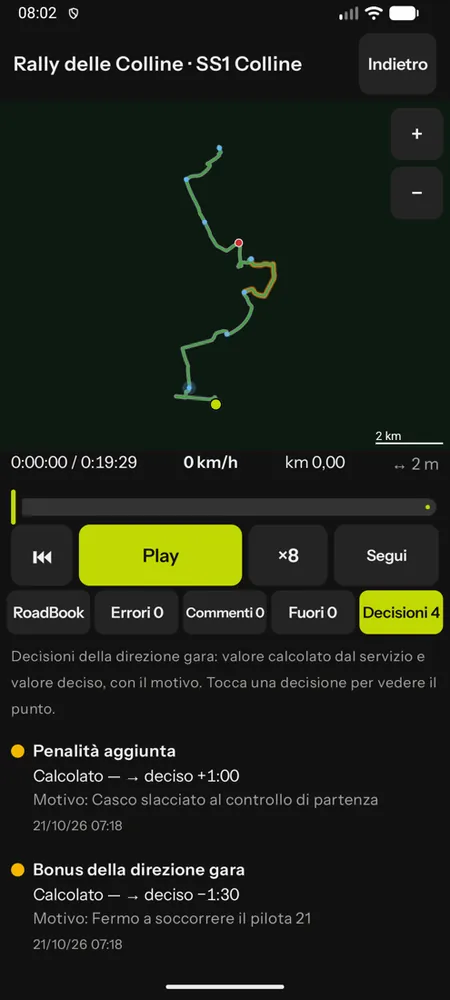
The player has the map with the correct track and your track in colour (green, orange, red, purple), off-course sections dashed, the waypoints with their radius and the STOPs; play and pause from ×1 to ×64, Follow, the time bar with its marks. The tabs:
- RoadBook: the note at the current position, moving with the replay (drawn as in the cockpit, if the roadbook is on the phone);
- Mistakes: each one explained and clickable, it takes you to the spot; if race control decided differently you see it next to it ("Decided: … (calculated: …)"), and a cancelled mistake is struck through;
- Decisions (only in race stages, if there are any): race control's decisions about you, with the calculated value and the decided one, the reason and the spot;
- Comments: the tutor's, and your reply, pinned to the point of the position;
- Off: the off-course episodes and the back-track.
Without a network the replay still opens: the ones already downloaded from the copy on the phone, those of rides not sent yet computed on the phone (with the main rules of the service's analysis).
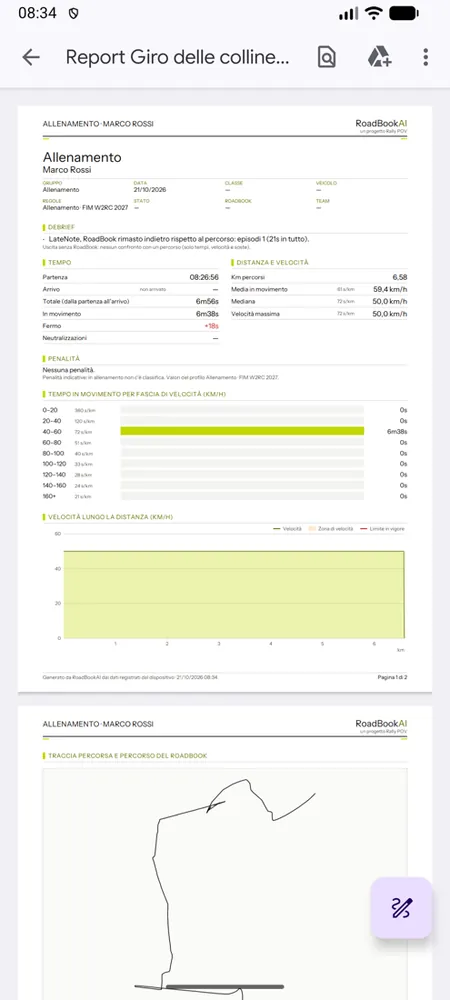
Each ride also has its PDF report (in the app from the summary, the history and the Replay list, Ride report PDF, and in the Studio under Replay › My rides): times, KM EXTRA and KM CUT, off-course episodes, waypoints, stops and speeding, the same one the tutor prints for the debriefing. For your own rides it is always available; for those of a group, the tutor decides. It can be downloaded once the ride's data have reached the service: until then, a line says so.
For events, Other riders' replays shows the other riders' runs according to the organiser's rule: only your own, everyone's at the end of the event or everyone's with a few minutes' delay ("data up to…").