

The rider app
Cockpit settings
The ten tabs of the app settings - Odometer, Display, RoadBook, Sounds, Track, Remote, Time, GPS, Waypoints and Device - profiles and the settings locked by the organiser.
The settings open from the home screen (the gear icon) or from the cockpit menu with All settings…. They are divided into ten tabs along the top; each item has a ? with a short explanation. The same items, with the same names, are on Android and on iPhone; where the position differs, the guide says so.
Odometer
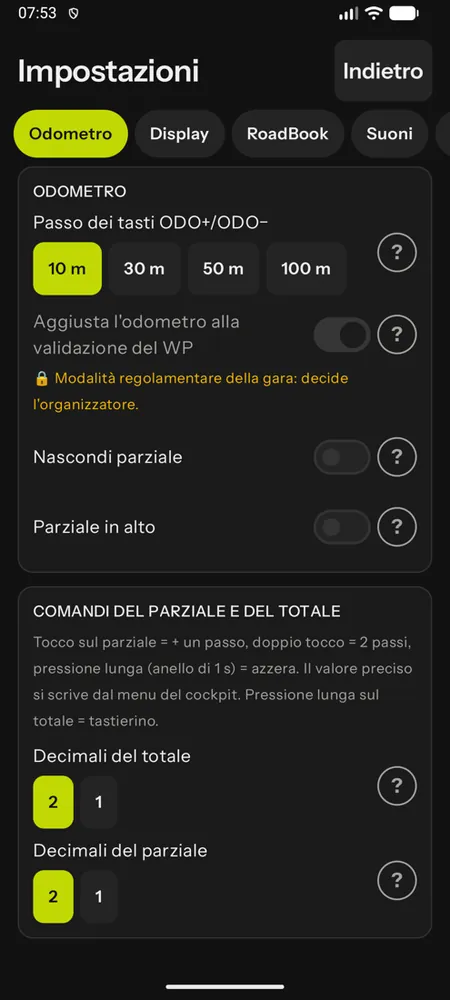
- ODO+/ODO− step: 10, 30, 50 or 100 m (default 10 m); holding the key down speeds up the step. It also applies to taps on the partial.
- Adjust the odometer when a WP is validated: when a waypoint with a distance in the roadbook is validated, the total is brought to that distance, compensating for the metres ridden after the centre. It is the function that keeps the roadbook aligned for the whole stage.
- Hide partial (the total fills the whole field) and Partial on top.
- Decimals of the total and the partial (2 or 1: the value is truncated, never rounded).
Display
- Theme, text size, instrument units (km and km/h or miles and mph; the notes stay in km, as in the roadbook), language.
- Cockpit mode: Standard, Minimal, Rally GPS; default large panel.
- Speed instead of CAP when there is no arrow; large speed; average CAP (Ø, the average of the last 10 seconds); degree symbol in the CAP.
- Instrument bar at the top, in the centre or at the bottom; waypoint row.
- Decimal separator (1,23 or 1.23) and total style (as the theme, white on black, cyan on black, black on cyan); digit font: Readable, Narrow, Rounded.
- Hide the km hundreds (120.99 → 20.99) and hide the note number.
- Extra keys: ODO−/ODO+ and Note−/Note+ visible or not, with a preview.
RoadBook
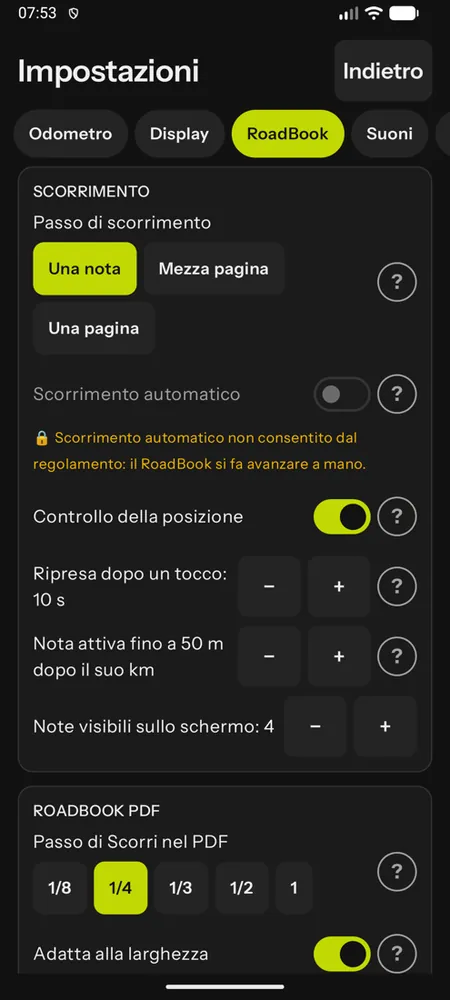
- Scroll step of the Scroll forward/back keys: one note, half a page, one page (Note± always moves exactly one note). For RoadBooks in PDF: 1/8, 1/4, 1/3, 1/2 or 1 page, and fit to width.
- Notes visible on the screen: on a phone at most 4 in portrait and 3 in landscape; on a tablet up to 5.
- Automatic scrolling with position check (locked off in FIM W2RC 2027 races and when the organiser or the tutor turns it off); resume after a touch (in seconds); note active until N m after its km.
- Countdown to the next note, strike passed notes, decimals of the RoadBook km.
- On iPhone, this tab also has the LateNote alert (on Android it is in the Waypoints tab, below).
Sounds
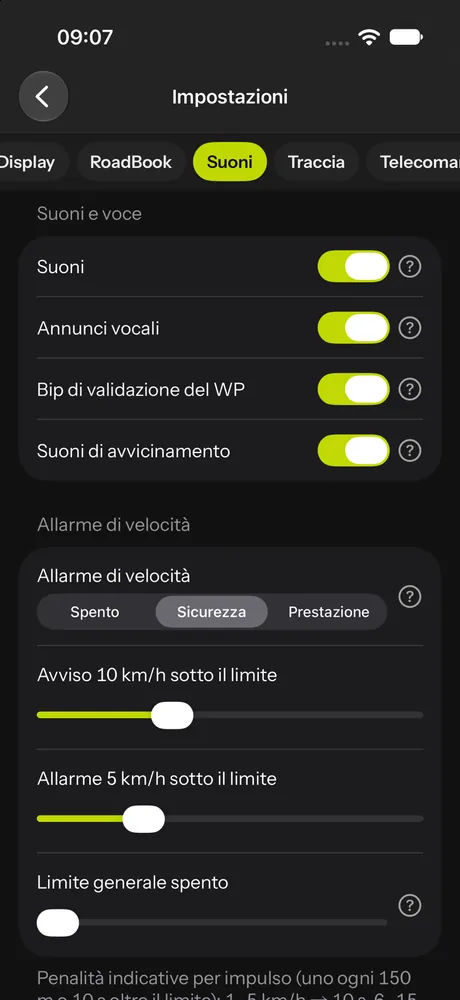
- Sounds and voice announcements (WP validated, zones, dangers, GPS, in the app language); validation beep; approach sounds for dangers 2 and 3 (200 m), race STOP and upcoming speed zone (300 m).
- Speed alarm with three presets: Off, Safety (warns before the limit), Performance (warns close to the limit, for riders chasing seconds). The sliders can be changed: warning and alarm in km/h below the limit and general limit outside the zones; if you change a preset, "Modified" appears. Below, the indicative penalties per pulse.
Track
- Map of the track ridden: Full (course and all WPs with their status), Training (course and validated WPs), Race (only where you have been and the validated WPs: missed WPs are never drawn, so the map cannot be used to look for them).
- Trail: 1, 5, 15 km or unlimited; show the course (never in Race mode).
- GPX map: map theme (automatic, light, dark), turn warnings. The GPX map always turns in the direction of travel (see GPX navigation); on Android, North up applies to the Track panel.
- Off-course alarm for personal rides: on or off, km ridden off course, distance from the track, back-track arrow.
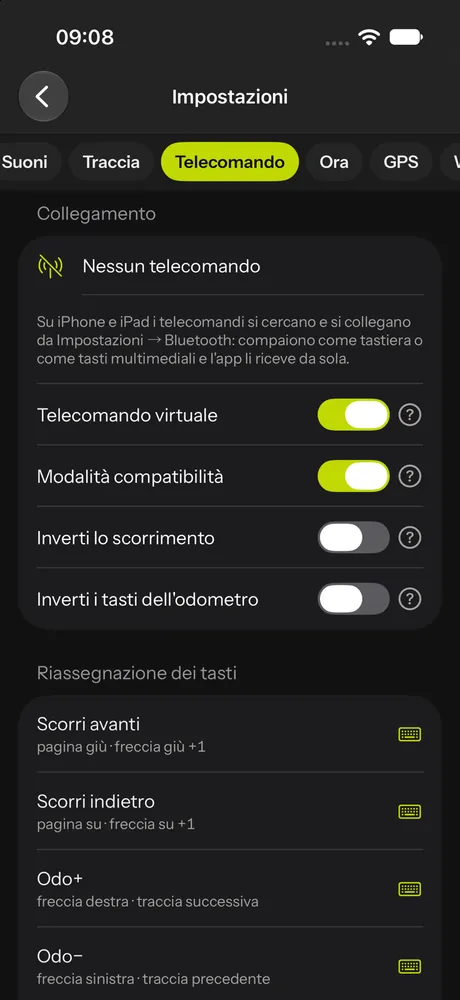
Remote
- Connection status: remotes are paired from the phone's Bluetooth settings (on iPhone only from there) and appear as a keyboard or media keys.
- Virtual remote: large keys on the screen that mimic the remote control.
- Compatibility mode for remotes that send media or volume keys; invert scrolling; invert the odometer keys.
- Key assignment: tap an action and press the key on the remote; holding the action down removes its keys; each action shows its keys ("Arrow right · Page down"). Actions: Scroll forward, Scroll back, Odo+, Odo−, Note+, Note−, Waypoint+, Waypoint−, Reset odometer, Reset partial, Strike note, Lock screen, Magnifier, Switch panel, Automatic scrolling, Voice note (recce). Restore defaults takes you back to the start.
Time
Race time: Automatic (the phone's), Manual (a fixed offset from UTC) or Event (set by the organiser and locked during the event). Recordings always stay in UTC.
GPS
- Anti-drift level: when stopped, the GPS "wanders" by a few metres; below the level's speed the metres do not count (off, low, medium, high).
- GPS accuracy in the instrument cell.
- External GPS: on Android a Bluetooth receiver connects through its own app as the phone's position and RoadBookAI automatically receives the best position.
Waypoints
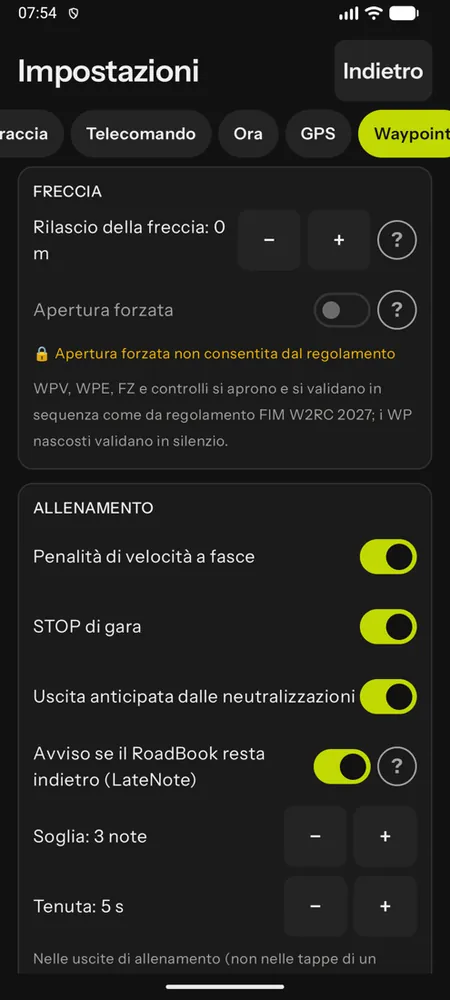
- Arrow release: a signed number relative to the centre of the WP (−40 removes it 40 m before, 0 at the WP, +30 keeps it until 30 m after), within the validation radius.
- Forced opening: long press on the arrow (or from the menu); the WP counts as missed. If the race regulations do not allow it, the item is locked with the reason ("Unlock only with the race control code").
- Training (personal rides; in the stages of an event the organiser decides, in groups the tutor): the race rules are switched off one by one (Banded speed penalties, Race STOPs, Early exit from neutralisations) and there is the Alert when the RoadBook falls behind (LateNote) with Threshold (notes) and Hold time (seconds); see Training and replay.
Device
- Device role: Main or Backup, when you use two phones or a phone and a tablet: both record, for the race the main one counts and the backup one is used if the main one is lost.
- Lock rotation at start; battery (exclude from battery saving, on Android).
- Profiles: you save all your settings under a name ("Race bike", "Training") and load them again with one tap.
- Sync: with an account, your settings go into your account profile and you find them again on a new phone.
- About: app version and licences.
Settings locked by the race
During a race stage some settings are decided by the organiser: the event time, the map of the track in Race mode, the off-course alarm, the class limit and, with regulation mode, also recalibration at WPs, the speed alarm, the danger sounds, forced opening and automatic scrolling. These items appear locked with the reason ("Rules: in a race the map only shows where you have been and the validated WPs"). At the end of the stage your own settings come back.