

Create and review
Recce - voice and written notes
From the notes recorded on a recce to proposals for the roadbook - recording with the RoadBookAI app (or with OsmAnd), uploading the files, listening, accepting, editing or rejecting.
After the recce (reconnaissance) you have two kinds of notes:
- voice notes, recorded with the RoadBookAI app or with OsmAnd while you ride (
noteLocations.gpxwith the.3gpor.m4aaudio files); - written notes, the points saved on the GPS with a name ("Danger Level 2", "HP"…), in a GPX file.
RoadBookAI places them on the roadbook track, transcribes the voice notes and turns them into proposals that you listen to and decide on. No voice note enters the roadbook without your "Accept".
Recording with the RoadBookAI app
In the app, on Android or on iPhone, there are two ways to do a recce: Recce from the card of a roadbook (or Recce on this RoadBook from the cockpit menu), to correct a roadbook you already have; Free recce from the home screen, on a new road.
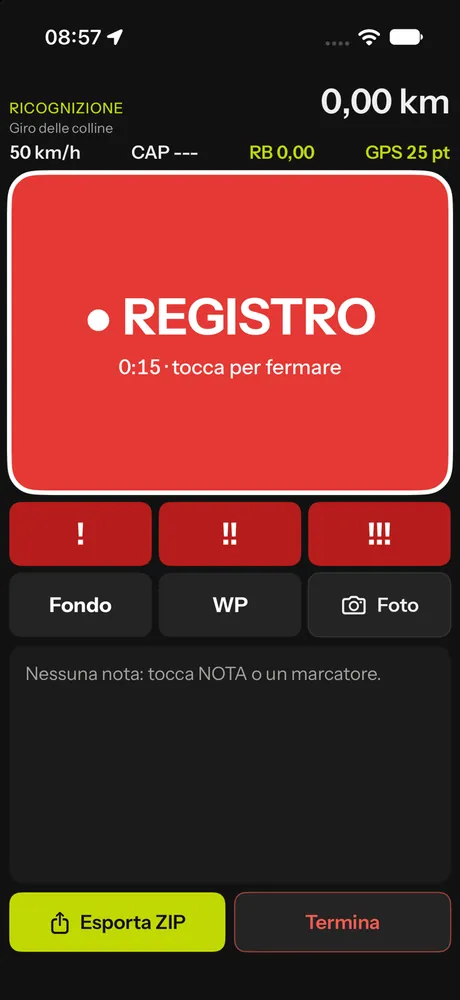
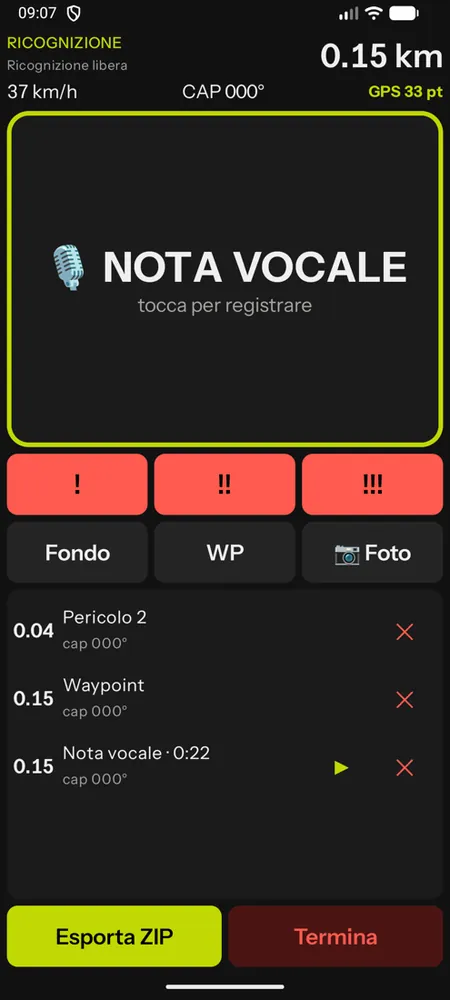
- The large VOICE NOTE button records your voice with position, CAP and km; tap it again to stop. It can also be operated from the remote control.
- Quick markers flag danger 1, 2 or 3, change of surface, waypoint and photo.
- The list lets you listen again and delete; the track is recorded the whole time.
- Export ZIP produces the package to upload into the Studio (track, voice notes, markers, audio and photos). You can also export it later, from the History. Danger markers arrive as "Danger Level N" and apply straight away.
Uploading the recce
- Open the roadbook and press 🎙 Recce in the editor bar.
- Press Upload recce (the second time, Add files).
- In the window, choose:
- Voice notes: the OsmAnd folder with
noteLocations.gpxand the audio files, or the individual files, or a ZIP; - Written notes (optional): the GPX of the points;
- Transcription:
small,mediumorlarge-v3-turbo.mediumis the best compromise, about 4 seconds per note; the first time, the server prepares the model.
- Voice notes: the OsmAnd folder with
- Press Process. A bar at the top shows the current phase.
Accepted formats: GPX, .3gp, .m4a, .mp3, .wav audio and other common formats, ZIP. Limits: 20 MB per audio file or GPX, 300 MB per ZIP, 400 MB in total.
If you add files later, the notes already processed keep your decisions: only the new ones are processed, at no extra cost.
What happens during processing
- Placement: each note is projected onto the track, within a 150 m corridor. Notes further away are off the track and are not transcribed. Where the track passes the same spot more than once, the km is ambiguous and the note needs reviewing. Several recordings at the same spot (a burst) are decided together, starting from the note that contains the text.
- Transcription on our server, with a rally vocabulary. Phrases produced by silence or noise are recognised and flagged as spurious audio.
- Interpretation with RoadBookAI's artificial intelligence: for each voice note the AI reads the transcription, the nearby notes in the roadbook (drawing, annotations, danger, surface), the map surface before, at and after the point, the direction of travel and the other nearby voice notes, and proposes an action with the FIA text, the confidence and the reason. The AI works only on the text, never on the audio.
- Safety check, independent of the AI: directions ("to the right"), negations ("don't turn"), relative references ("100 metres later"), doubts, uncertain transcriptions and ambiguous positions always become to review.
Curated written notes apply straight away: danger ("Danger Level 1/2/3"), start and end of speed limits with DZ and FZ, HP. They attach to the roadbook note within 18 m or create a new one; they never change the km, position or drawing of existing notes.
Interpretations are kept in memory: processing the same recce again costs nothing.
Deciding on the notes
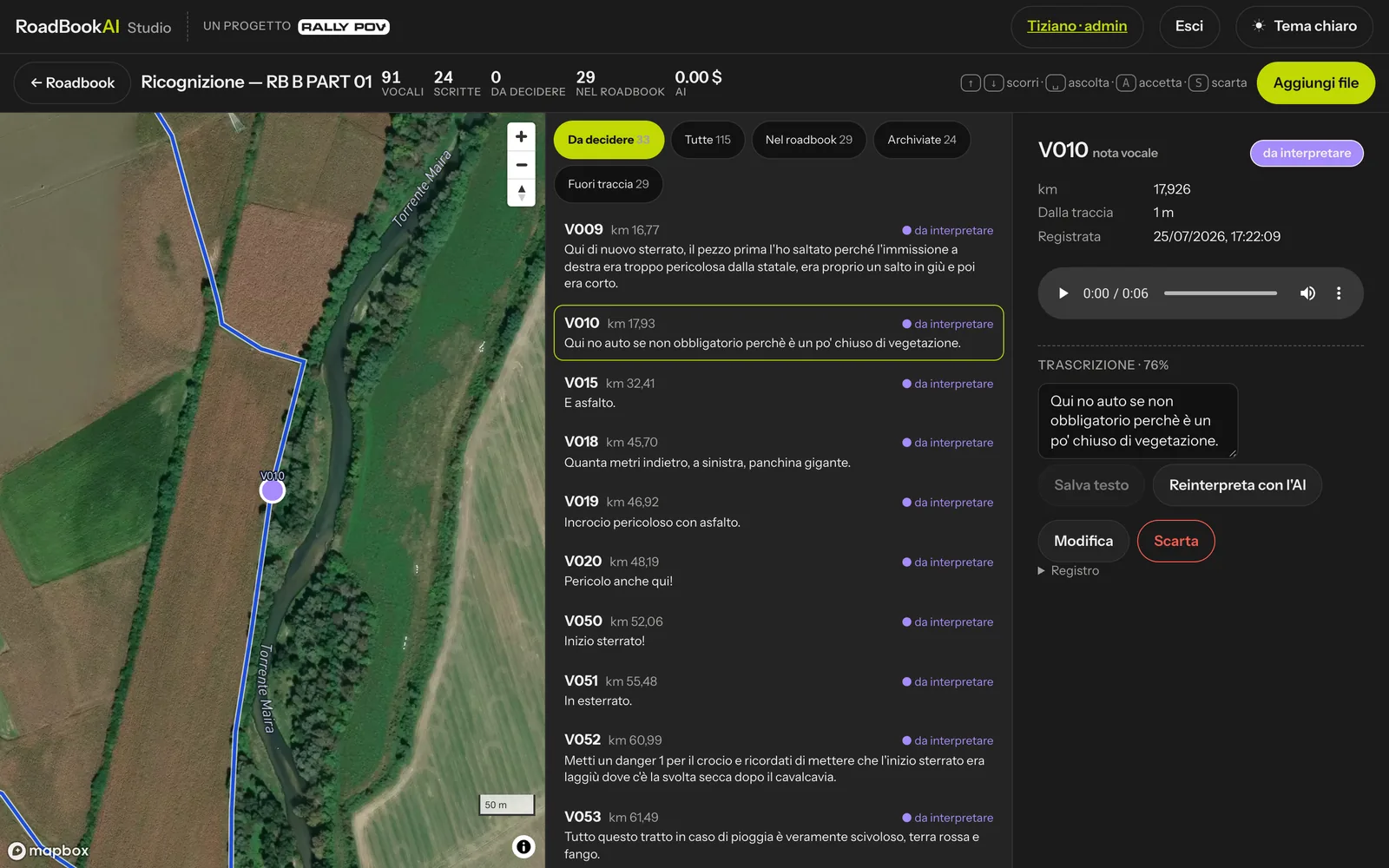 The Recce view: map of the notes, filtered list and details with audio and proposal.
The bar at the top counts the voice and written notes, those to decide, those already in the roadbook and the cost of the interpretation. The list has five filters: To decide, All, In roadbook, Archived, Off track.
For each note the details show:
- km (with the alternative km if the track passes again), distance from the track and time of recording;
- the audio player;
- the transcription with its confidence; you can correct it, press Save text and then have the AI reinterpret it;
- the proposal: what to do (new note, change to the annotations, danger, change of surface, waypoint, start or end of HP, speed limit, or organisational, not actionable, spurious audio), who proposed it, the confidence and the reason; if it is to review, the list of reasons;
- the roadbook note concerned, with its drawing.
Then choose:
| Choice | What happens |
|---|---|
| Accept (A) | the proposal enters the roadbook: a new note or an updated note |
| Edit | correct the proposal (what to do, note or km, danger, surface, waypoint type, FIA text and free text) and press Save and accept |
| Reject (S) | the voice note stays archived, the roadbook does not change |
↑ and ↓ move through the list, the Space bar starts or stops the audio. After a decision you move on to the next note to decide.
Accepted notes appear in the editor's RoadBook with the source Recce voice note (or written note) and, in the next saved version, with NEW NOTE or MODIF.
In the Recce view a decision is final: if you accept a note by mistake, correct it from the editor, directly on the roadbook note.
Tips for recording
- Use short phrases with roadbook words: "start of dirt road", "danger junction with asphalt" and "put a danger 1" become the right proposals, in the right place.
- Very short notes can come out garbled in the transcription: listen to them again and correct the text before reinterpreting them.
- Directions and relative distances are always left to review: listen to them calmly in the Studio.